The Overview page
The Overview page is your home screen. It shows how much of your plan you use, lists your playlists and is where you add a new one. Follow these steps to open it and find your way around.
Steps
- Open the Overview page: Click the M3UTool logo at the top of the icon bar on the left. Pointing at it shows Overview & playlists. With a playlist open, the page slides in over the editor. Click the logo again, or the cross, to go back.
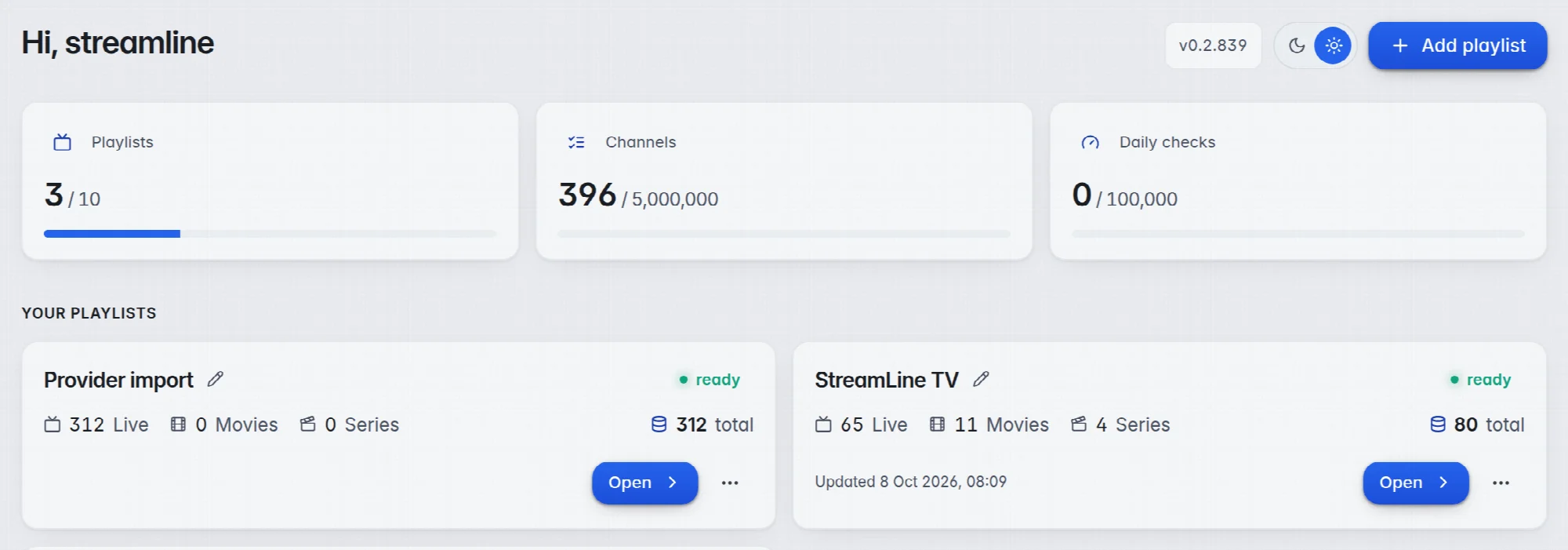
- Read your usage: The three tiles at the top show what you use against your plan's limit.
- Find your playlist: Each playlist has its own card under Your Playlists.
- Open it: Click Open on the card. The editor opens on Live TV.
What is on the page
- Add playlist: Starts the import window for a new playlist. More in Add a playlist.
- Version: The number next to it, for example v0.2.663, is the editor version. Mention it when you write to support.
- Light and dark: The sun and moon switch changes the colours of the editor.
- Playlists: How many playlists you have, out of how many your plan allows.
- Channels: How many channels your playlists hold together, next to your plan's limit.
- Daily checks: How many channel checks you ran today, out of your daily allowance. More in Plans and limits.
- The playlist card: The name with a pencil to rename it, the status (ready, error, or a word like importing… while M3UTool is busy), the number of Live channels, Movies, Series and the total, and when it was last Updated.
- The three dots (…): At the right of each card. They hold Reset channels, Reset movies, Reset series and Delete playlist. More in Rename, start over or delete.
The icon bar
The bar on the left is the same on every screen. Point at it with the mouse and it opens to show the names.
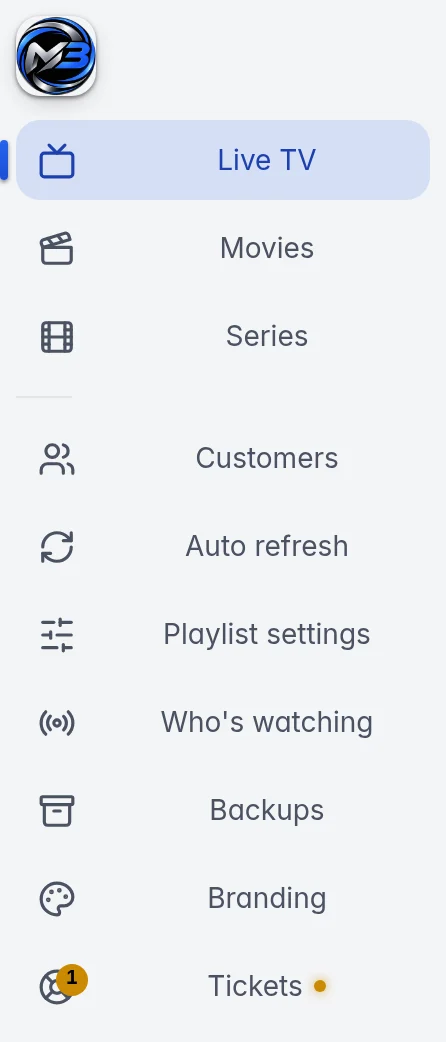
- Live TV, Movies and Series: The editor for each part of the open playlist.
- Customers: The logins you sell. More in How customers work.
- Auto refresh: Your providers and when M3UTool fetches their changes. More in Refresh a playlist.
- Who's watching: The customers watching right now. More in Who is watching.
- Backups: Snapshots of the open playlist. More in Backups and restore.
- Branding: Your name, logo and colours. More in Branding and custom domain.
- Tickets: Your messages with M3UTool support. A number on the icon shows how many of your tickets are open. More in Support tickets.
- Plan & billing, Account and Sign out: At the bottom of the bar. The Overview page opens with the M3UTool logo at the top.
Good to know
- Note: The playlist buttons in the bar are greyed out until you open a playlist.
- With only one playlist, M3UTool skips the Overview page after you sign in and opens that playlist straight away.
- To switch between playlists without the Overview page, click the playlist name at the top left of the editor and pick another one. All playlists… at the bottom of that list opens the Overview page.
- Right after your first import, a card You're set up. A few things to try next: lists the next steps. Click Got it to hide it.