Provider logins
Behind every customer is a provider login: the username and password you bought from your provider for this customer. When the customer starts a channel, M3UTool puts that login into the channel address, so the video comes from your provider. The customer never sees it. When your playlist uses more than one provider, the customer needs a login at each of them. Follow these steps to set a customer's provider logins.
Steps
- Open the customer: In Customers, click the customer in the list.
- Open Your source: Click the Your source tab.
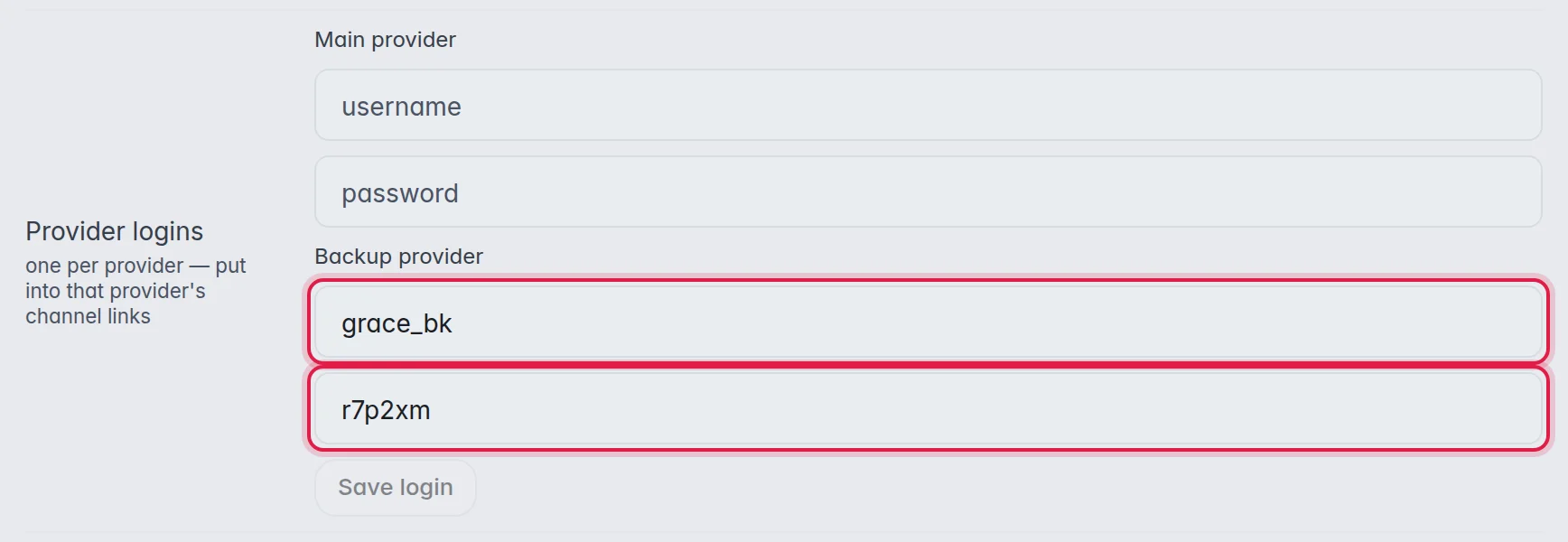
- Enter the login: With one provider, type the username and password next to Login. With several providers, Provider logins has one pair of fields per provider, named after the provider. Fill in the login this customer has at each provider.
- Test it: Click Test connection next to Connection test. Login OK means the provider accepts the login, followed by the provider's end date.
- Save: Click Save login. A login does not save by itself.
The fields
- Server: The address of your provider's server. You cannot change it here; it comes from the playlist.
- Login: Shown when the playlist has one provider. The username and password of this customer at that provider.
- Provider logins: Shown when the playlist has several providers. One username and password per provider, each used only for that provider's channels.
- Connection test: Tests the login. With several providers, it tests the login of the first provider in the list.
Good to know
- When you add another provider to a playlist, your customers keep their login for the providers they already had. Only the new provider's fields are empty. Fill them in, or those channels will not play for your customers. More in Add another provider.
- An empty pair, like Main provider in the picture, means M3UTool uses the provider login you entered when you added the customer. That only works if this provider accepts the same login.
- Tip: Use one provider login per customer. Your provider counts connections per login, and the number of devices you can sell depends on it. More in Devices and connections.
- The customer's M3U link and Xtream login only contain your M3UTool addresses. Your provider's addresses and logins stay hidden from the customer.
Troubleshooting
Some groups play and others do not. The channels that fail usually come from a provider this customer has no login for. Open Your source and fill in the missing provider.
Test connection shows a warning. The message says what went wrong, for example a wrong password or a provider that cannot be reached. Check the login with your provider.