The bin
Everything you delete in M3UTool goes to the bin first, so a deleted channel is never lost by accident. From the bin you restore it, move it into another group, or delete it for good. Live TV, Movies and Series each have their own bin. Follow these steps to restore or remove what you deleted.
What is in the bin
Open the Bin tab in Live TV, Movies or Series. At the top are two lists:
- Deleted: What you deleted, and channels a refresh removed because your provider dropped them. The number next to it counts them.
- Not working: Channels a check found broken and set aside. More in Not working channels.
The groups are on the left with how many channels of each are in the bin. Click one to see its channels in the middle, and click a channel to see its details on the right. The search box in the top bar finds groups and channels in the bin. Series are listed by show, with their episodes inside.
Your customers never see anything that is in the bin.
Restore a channel
- Open the Bin tab: Click Bin under the top bar.
- Find the channel: Click its group on the left, or search for it.
- Open it: Click the channel. Its details open on the right.
- Restore it: Click Restore. The channel goes back to the group it came from, with all your edits.
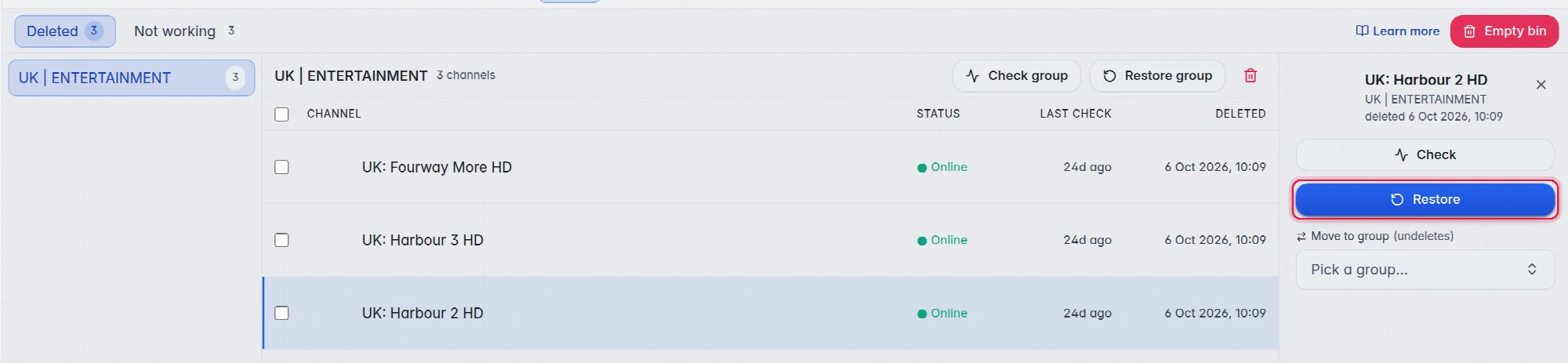
To put it into another group instead, pick one under Move to group.
Tip: Not sure the channel still works? Click Check in its details first. It tests the stream without restoring it.
Restore a whole group
- Pick the group: Click it on the left.
- Restore it: Click Restore group above the list of its channels.
Restore or delete several at once
- Select: Tick the boxes in front of the channels, or hold Ctrl and click groups on the left. A bar appears at the bottom.
- Act: Click Restore, Check, pick a group under Move to group…, or click Delete permanently.
Delete for good
- One channel: Click Delete permanently in its details.
- One group: Click the red bin icon next to Restore group.
- The whole bin: Click Empty bin at the top right. This empties the bin of the part you are in.
Each asks you to confirm first.
Good to know
- Important: A channel deleted for good cannot come back from the bin. If your provider still carries it, the next refresh adds it again as a new channel, without your edits. This is because the entry in the bin is what tells a refresh to leave that channel out.
- A channel you deleted yourself is not added again by a refresh while it is in the bin. That is why deleting, and leaving it in the bin, is the way to keep a channel out for good. A channel a refresh removed comes back by itself if your provider brings it back.
- Things stay in the bin until you restore them or delete them permanently.
- Right after a delete, Undo in the top bar is quicker than the bin. More in Undo.