Prefix, suffix and case
Prefix / suffix adds text to the start or the end of your names, or takes it off again. Upper / lower case switches names to capitals, small letters or a capital at the start of every word. Both are tools in the Bulk rename window, and both work for group names too. This lets you give a whole group one look, for example "UK: " in front of every British channel. Follow these steps to change the start, the end or the capitals of your names.
Add or take off a prefix or suffix
- Open Bulk rename: Click Tools in the top bar of the editor, then click Bulk rename… under Rename & provider.
- Choose the tool: Next to How, click Prefix / suffix.
- Choose the channels: Under 1 On what?, pick Ticked (N), Ticked groups (N), This group, Pick groups… or All Live TV. The window has already picked what you ticked, or the group you have open.
- Choose the action: Under 2 Options, pick Add at the start, Add at the end, Take off the start or Take off the end.
- Type the text: In Text, type exactly what to add or take off, spaces included. Example: "UK: " with a space after the colon.
- Check the preview: 3 Preview shows the names Before → After and how many will change.
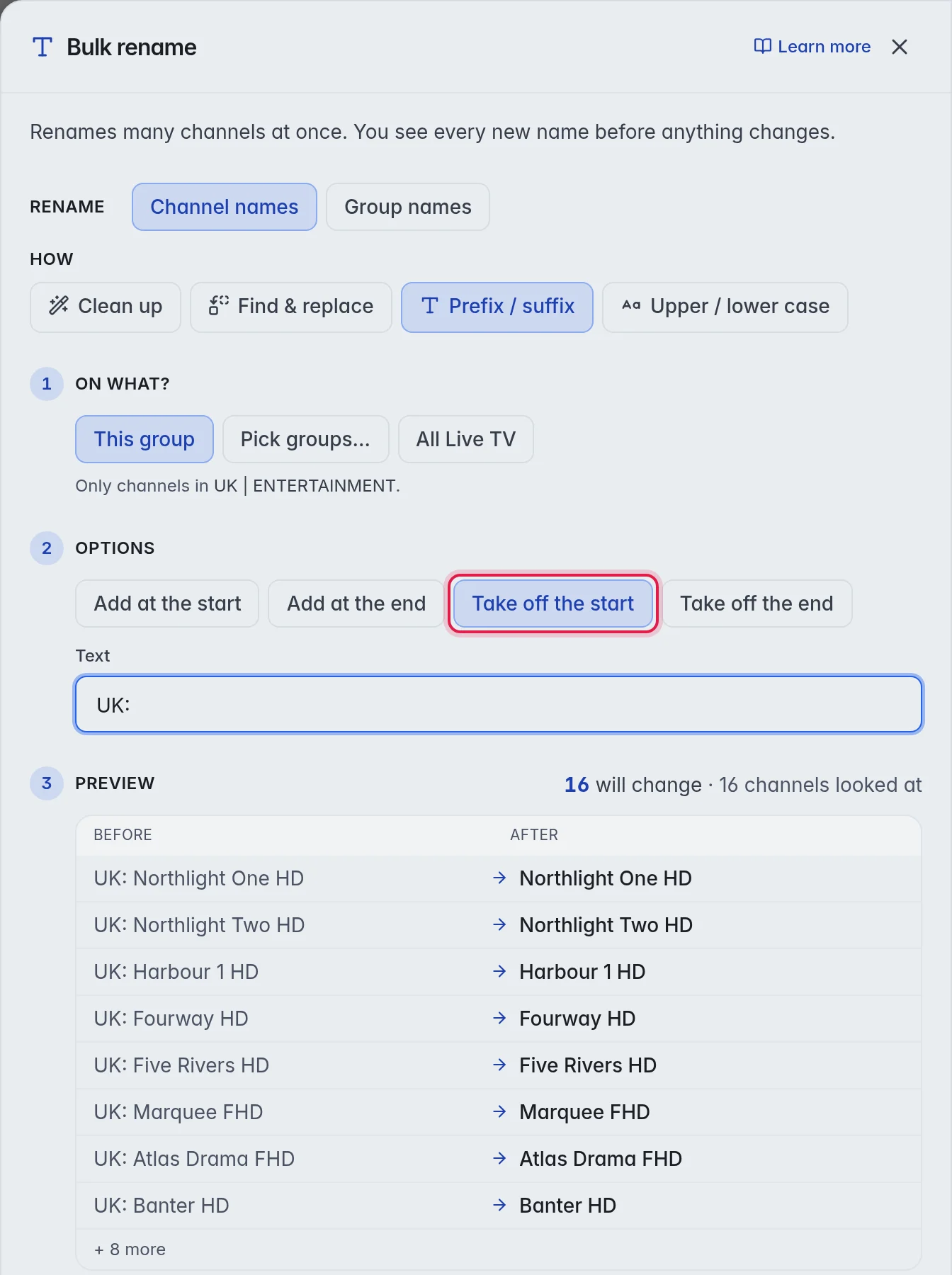
- Rename: Click Rename N with your number.
The actions:
- Add at the start: Puts your text in front. Example: "Northlight One" becomes "UK: Northlight One".
- Add at the end: Puts your text at the end. Example: " (Backup)" turns "News One" into "News One (Backup)".
- Take off the start: Takes your text off the front, only where the name starts with it exactly.
- Take off the end: Takes your text off the end, only where the name ends with it exactly.
Change the capitals
- Choose the tool: In the Bulk rename window, click Upper / lower case next to How.
- Choose the channels: Under 1 On what?, pick as above.
- Choose the style: Under 2 Options, pick Title Case, UPPERCASE or lowercase.
- Rename: Check 3 Preview, then click Rename N with your number.
The styles:
- Title Case: "NEWS ONE" becomes "News One".
- UPPERCASE: "News One" becomes "NEWS ONE".
- lowercase: "News One" becomes "news one".
Note: Title Case also changes short names in capitals. "UK NEWS" becomes "Uk News". For channels, Fix names gives better results, because it uses the real spelling. More in Fix names.
Good to know
- Note: Add at the start does not look at what the name already starts with. Run it on a group that already has the prefix and every name gets it twice. The preview shows this before you press the button.
- To rename groups instead of channels, click Group names next to Rename at the top of the window. More in Groups.
- Undo in the top bar takes the run back. More in Undo.