Plan and billing
Your plan sets your limits: how many customers and playlists you can have, how big each playlist may be, how many checks run per day, and how many tasks run at once. You pick it with three sliders on Plan & billing and pay for it there, by card or with PayPal. A payment covers one month or one year. Nothing renews by itself.
Steps
- Open Plan & billing: Click Plan & billing at the bottom of the bar on the left of the editor.
- Choose how long: Click Monthly or Yearly above the sliders. Yearly gives you 2 months free.
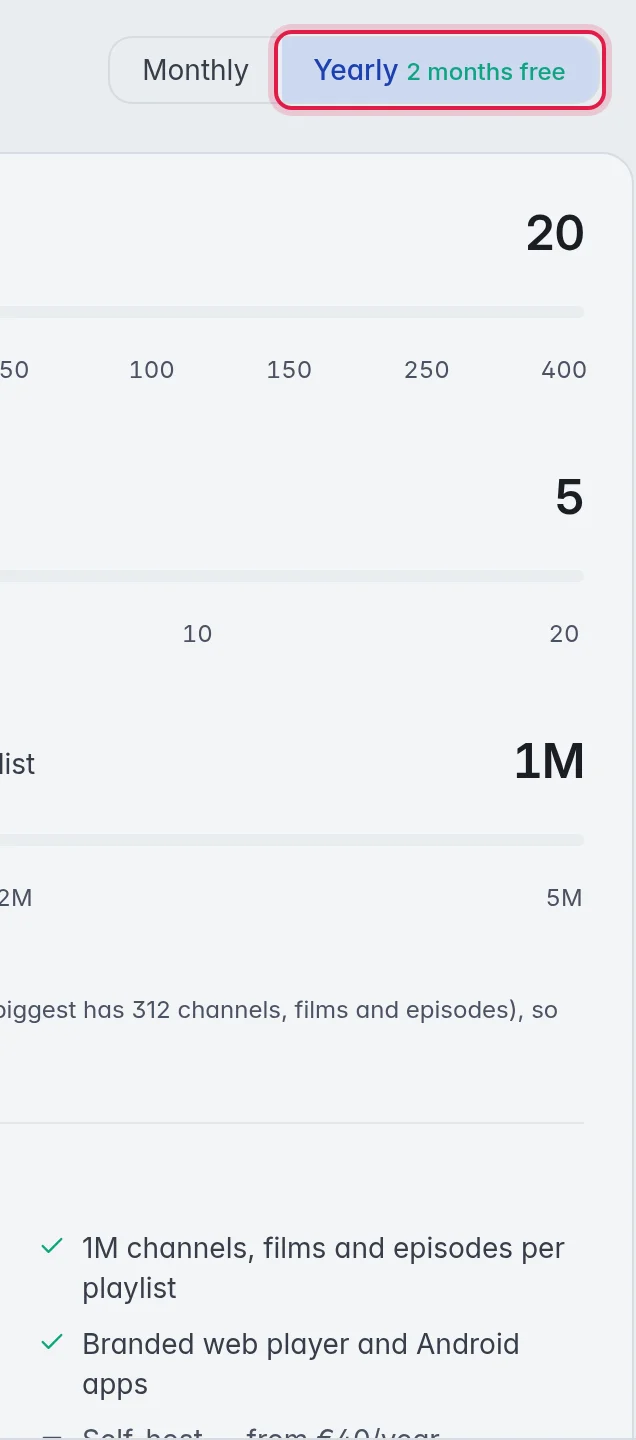
- Slide to your size: Move Customers to the number of customers you have or expect, Playlists to the number of playlists, and Channels, films and episodes per playlist to the size of your biggest playlist. The price box on the right changes as you slide.
- Pay: The price box says what you pay and until when. Click PayPal to pay with your PayPal account, or Debit or Credit Card to pay by card. A card needs no PayPal account. Finish the payment in the window that opens.
- Done: The page says the payment went through, and your plan is on straight away. PayPal emails you the receipt.
What the sliders change
- Customers: 1, 10, 20, 30, 50, 100, 150, 250 or 400. More customers also give you more checks per day and more checks at once.
- Playlists: 2, 5, 10 or 20.
- Channels, films and episodes per playlist: 1M, 2M or 5M. 1M is included. 2M costs €2 a year more for every playlist, 5M €5 for every playlist. So 2M on 10 playlists adds €20 a year.
Every plan includes the TV guide for every country, the branded web player and Android apps, and automatic backups. Self-host comes with plans from €40 a year. The list under the sliders shows exactly what you get for the size you picked.
Small sizes that cost less than €29 a year are paid yearly only. For those, Monthly is greyed out. Monthly starts at €2.90 a month.
New accounts get a 14-day free trial with every feature when they link Discord, with up to 5,000 checks a day and without self-host. Paying for a plan during the trial ends the trial, and your plan starts right away.
Pay the next period
- A reminder comes first: 7 days before your paid period ends, you get an email (and a Discord message if you linked Discord).
- Pay ahead: From 30 days before the end, the price box offers the next period. It starts on the day your current one ends, so you lose no days.
- Nothing is charged by itself: If you do nothing, your plan simply ends on its date. There is nothing to cancel.
Bigger or smaller
- Bigger, right now: Move the sliders up. The price box shows Upgrade now with the difference for the days you have left. Your end date stays the same. After that you pay the bigger size as usual.
- Smaller: Pick the smaller size when you pay the next period. It starts with that period.
- Smaller steps are grey: You cannot pick fewer customers or playlists than you have now, or a size smaller than your biggest playlist. Delete some first if you want a smaller plan.
When the period ends without a payment
- The editor shows a bar at the top, and Plan & billing tells you how many days you have left. You get 14 days.
- During those days everything keeps working.
- Paying in those days continues from your old end date, not from today.
- If the time runs out, your plan ends. You can still sign in. Nothing is deleted, but your playlists and your customers' feeds stop until you pay for a plan again. The editor then opens on Plan & billing, so you can pick a plan and carry on where you left off.
Important: Pay in time. Without an active plan your customers cannot watch. Their apps say the service is temporarily unavailable.
Good to know
- Card declined? Nothing is charged. Try another card, or PayPal.
- Refunds: A full refund within 14 days of your first payment. Write to support from your account's email address. More in the refund policy.
- Your live usage against the limits is on Account. More in Your account.
- Had a plan from before the sliders, like Starter or Pro? You keep it. Paying for a plan with the sliders replaces it.
- Need more than 400 customers, or something special? Open a support ticket and ask. Custom plans are available. More in Support tickets.