Fix names
Provider names often carry country codes, quality tags and odd capitals, like "UK: NORTHLIGHT ONE FHD". M3UTool has two tools for this. Fix names looks each live channel up in the M3UTool channel database and gives it its proper name. Clean up in Bulk rename takes the clutter out by rules you switch on, and works for movies, series and group names too. Clean names also help the TV guide, logo and poster matching find the right channel. Follow these steps to fix your names.
Step 1: Fix names from the channel database
- Open Fix names: Click Tools in the top bar of the editor, then click Fix names under Fix & fill. The window Fix names opens.
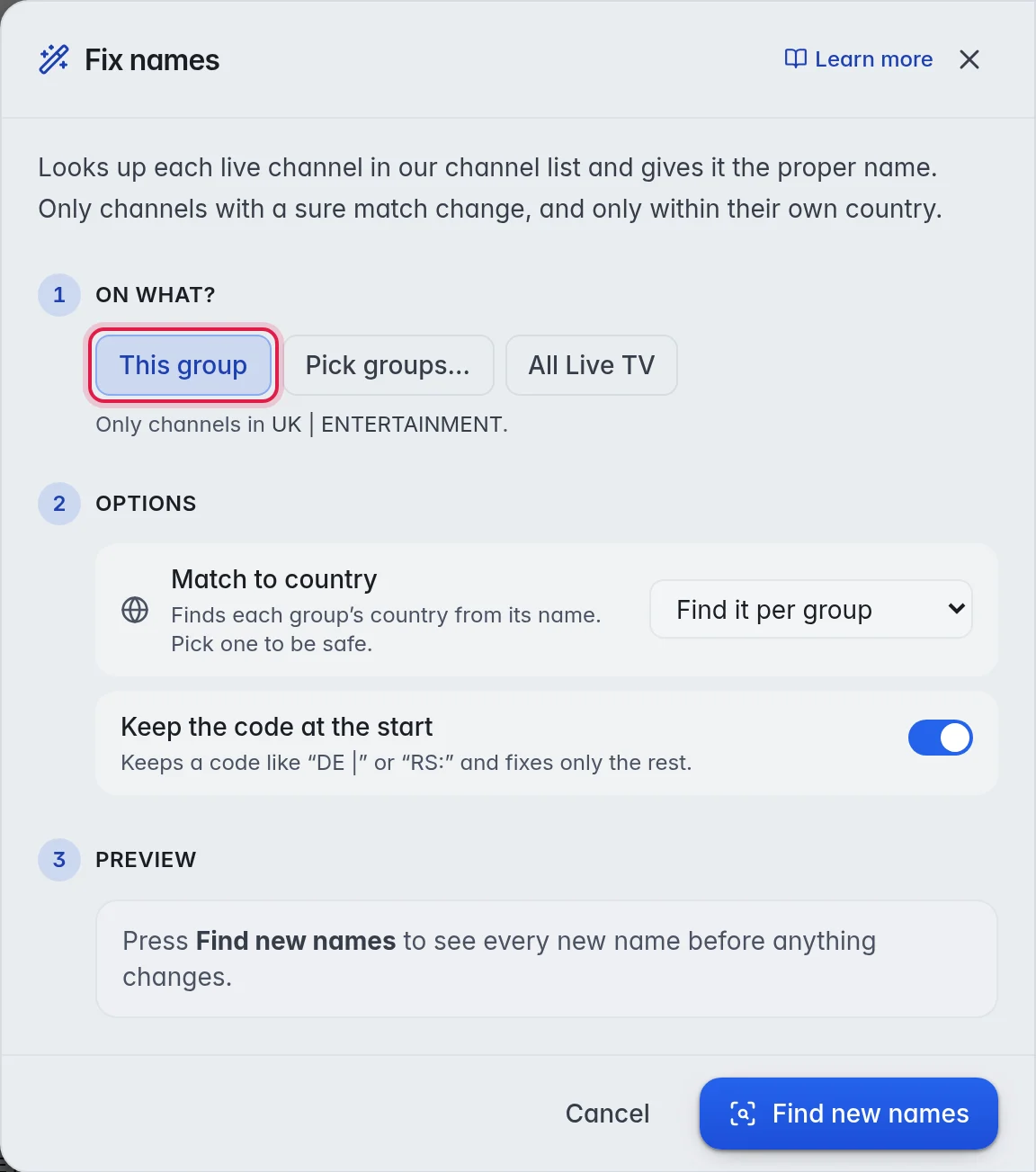
- Choose the channels: Under 1 On what?, the window has already picked what you ticked, else the ticked groups, else the group you have open. Click another choice when you need one: Ticked (N), Ticked groups (N), This group, Pick groups… or All Live TV.
- Set the options: Under 2 Options, leave Match to country on Find it per group, or pick one country from the list. Leave Keep the code at the start on to keep a code such as "UK:" in front of the name.
- Find the names: Click Find new names. After a moment, 3 Preview shows a Before → After list and how many will change, for example "14 will change · 62 looked at".
- Rename: Check the list, then click Rename 14, with your number.
The options:
- Match to country: Find it per group reads the country of each group from its name or its country setting. Pick one country to use only that country's names, so a channel never gets the name of a foreign channel with the same name.
- Keep the code at the start: When this is on, a code like "DE |" or "RS:" stays and only the rest of the name is fixed. When it is off, the whole name is replaced. Example: "UK: NORTHLIGHT ONE FHD" becomes "UK: Northlight One" with it on, and "Northlight One" with it off.
Note: A channel without a sure match keeps its name. Fix names never guesses.
Step 2: Clean up the rest with Bulk rename
- Open Bulk rename: Click Tools in the top bar, then click Bulk rename… under Rename & provider. The window Bulk rename opens with Clean up chosen next to How.
- Choose what to rename: Next to Rename, leave Channel names on. On the Movies tab it reads Movie names, on Series Series names. Group names renames the groups instead. More in Groups.
- Choose the channels: Under 1 On what?, pick Ticked (N), Ticked groups (N), This group, Pick groups… or All Live TV.
- Switch on what to take out: Under 2 Options, turn the switches on or off. 3 Preview updates as you go.
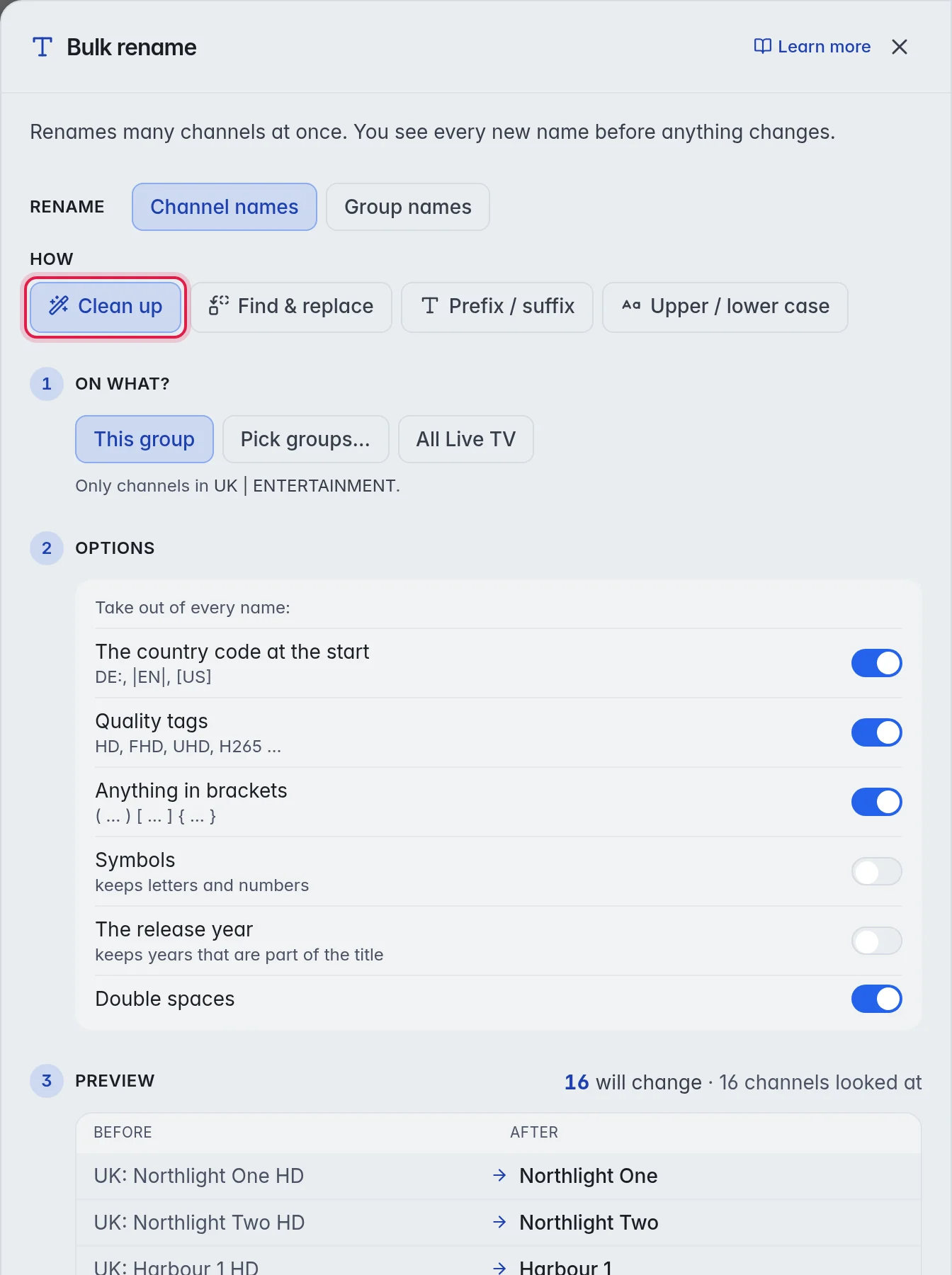
- Rename: Read the Before → After list, then click Rename N with your number.
The switches, under "Take out of every name:":
- The country code at the start: Takes a code like DE:, |EN| or [US] off the front. Example: "DE: Rheinblick" becomes "Rheinblick".
- Quality tags: HD, FHD, UHD, H265 and the like. Example: "Northlight One FHD H265" becomes "Northlight One".
- Anything in brackets: Round, square and curly brackets with what is inside. Example: "News One (backup)" becomes "News One".
- Symbols: Removes every symbol and keeps letters and numbers. Example: "Matchday-Football" becomes "Matchday Football".
- The release year: For movies and series. Keeps years that are part of the title. Example: "Sintel (2010)" becomes "Sintel", while "Station 2049" keeps its number.
- Double spaces: Turns runs of spaces into one.
Other ways to fix names
- For a few channels: Tick them in the grid. In the panel on the right, click Fix names… under Enrich & fix. The Fix names window opens with Ticked (N) chosen.
- For one group or several: Click the group in the list on the left, or tick several. In the panel on the right, click Fix names under Tools. This runs straight away, without a preview. More in Groups.
- After every update: Switch on the Fix channel names step under Checks & updates in Playlist settings, so new channels arrive with proper names. More in Playlist automation.
Tag genres and the adult flag
The same channel database knows the genre of most channels and which ones are for adults. Click Tools in the top bar, then Tag genres & 18+ under Fix & fill. The window has one step, 1 On what?. Choose what it runs on and click Tag channels. The result appears in the window. Channels flagged as adult follow the parental lock in the M3UTool apps. This tool runs straight away, without a preview.
Good to know
- Tip: Set the country of a group in its panel before you fix its names. Matching then stays inside that country. More in Groups.
- Fix names is for live channels. For movies and series, the names come from TMDB. More in Fill in posters and info.
- A name fix can be taken back with Undo in the top bar. More in Undo.