The API
Everything you do to a playlist in the editor, a script can do too: list channels, rename, move, hide, delete and restore, refresh a playlist and undo. The same rules apply as in the editor, with the same Undo and the same bin. Follow these steps to make an API key and your first call.
Step 1: Make a key
- Open Account: Click Account at the bottom of the bar on the left of the editor.
- Find API keys: Scroll down to API keys and click New key.
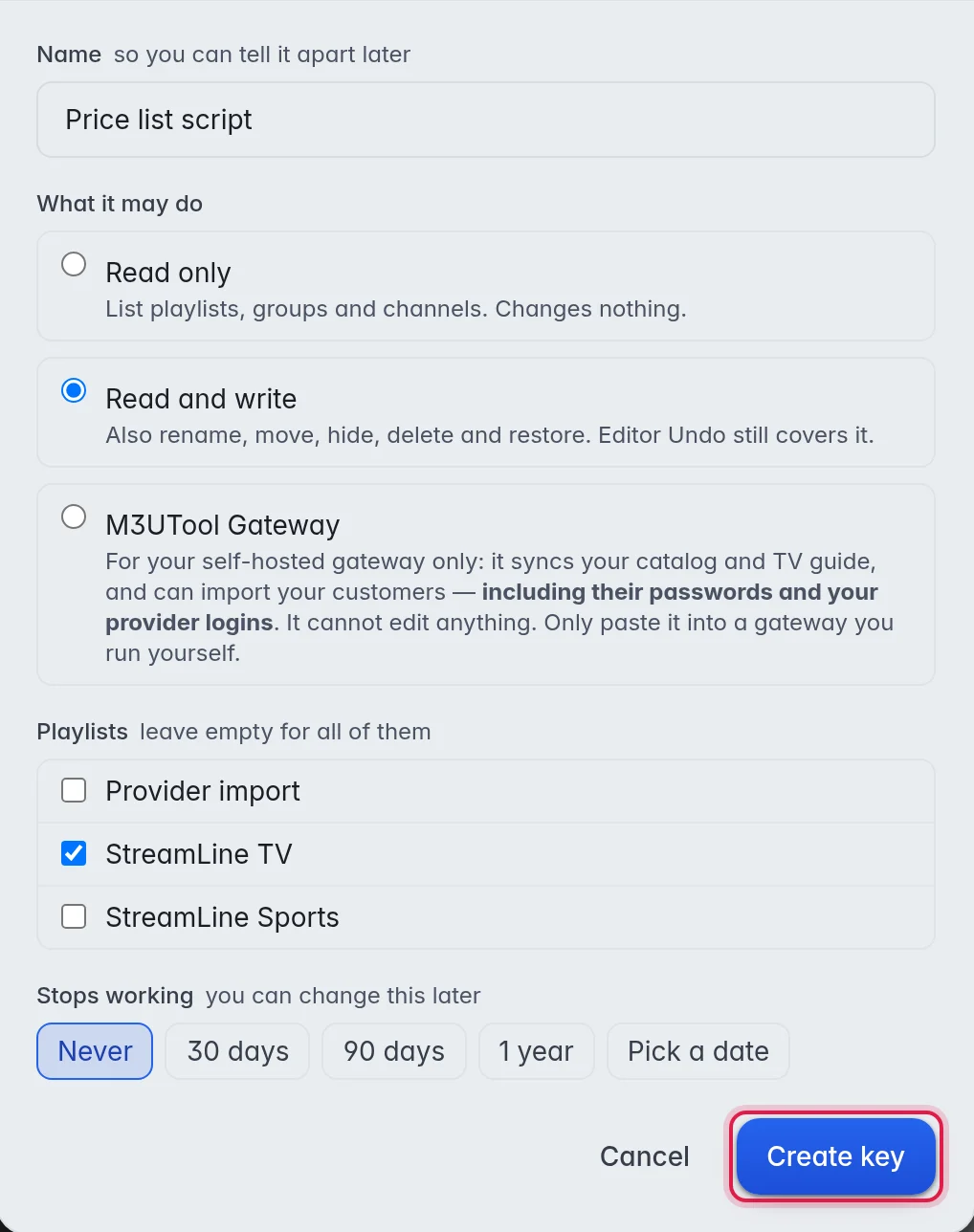
- Name it: Type a Name, for example "Price list script", so you can tell your keys apart later.
- Choose what it may do: Under What it may do, choose Read only or Read and write.
- Choose playlists (optional): Under Playlists, tick the playlists the key may reach. Leave all unticked for every playlist.
- Choose when it stops (optional): Under Stops working, pick Never, 30 days, 90 days, 1 year or Pick a date.
- Create it: Click Create key.
- Copy the key: Copy it and keep it somewhere safe. To see it again later, click Show next to the key under API keys.
The options:
- Read only: The key can list playlists, groups and channels. It changes nothing.
- Read and write: The key can also rename, move, hide, delete and restore. The editor's Undo still covers it.
- M3UTool Gateway: Only for an M3UTool Gateway you run yourself. It can read your customers with their passwords and your provider logins, and it cannot edit anything. It needs a paid plan, so you cannot pick it during the free trial.
- Playlists: A key tied to playlists cannot see the rest of your account.
- Stops working: After this date the key is refused. Seven days before, M3UTool sends you an email, and a Discord message when your Discord is linked. To change the date, click the calendar icon next to the key. This also brings back a key that has already stopped.
Note: An M3UTool Gateway key with an end date stops your self-hosted M3UTool from syncing on that day. Give it a new date before then.
Important: M3UTool keeps your keys locked, so a copy of M3UTool's database alone does not open them. Only you see them, with Show. Keys made before 6 October 2026 cannot be shown again: if you lose one, make a new key and revoke the old one.
Step 2: Make a call
Send the key with every call, as a bearer token. The address is https://editor.dontv.shop/api/v1.
curl https://editor.dontv.shop/api/v1/playlists -H "Authorization: Bearer dontv_ab12cd34_..."On Windows, type curl.exe instead of curl. Every answer is JSON with an ok field:
{ "ok": true, "playlists": [ ... ] }
{ "ok": false, "error": "Missing API key. Send it as: Authorization: Bearer <key>" }
GET /api/v1 needs no key and lists every call the API offers.
Step 3: Try calls in the API docs
- Open the docs: Under API keys, click API docs. They open at
https://editor.dontv.shop/api/v1/docs. - Add your key: Click Authorize, paste your key under bearerKey, and click Authorize again.
- Try a call: Open a call, click Try it out, then Execute. The answer shows below it.
Important: Try it out on a call that changes something really changes your playlist. The page forgets your key when you close the tab.
Tools that read OpenAPI can load the full list from https://editor.dontv.shop/api/v1/openapi.json.
What you can call
Playlists
| Call | What it does |
|---|---|
GET /api/v1/playlists | Your playlists. |
POST /api/v1/playlists | Make a playlist: {name}, plus source_url for a provider link. |
GET /api/v1/playlists/{id} | One playlist. |
PATCH /api/v1/playlists/{id} | Rename or change it. |
DELETE /api/v1/playlists/{id} | Delete it for good. This one has no bin. |
POST /api/v1/playlists/{id}/sync | Refresh it from its provider. Answers with a job_id. |
Groups
| Call | What it does |
|---|---|
GET /api/v1/playlists/{id}/groups | The groups. Add ?type=live, vod or series. |
POST /api/v1/playlists/{id}/groups | Make a group: {name, type}. |
PATCH /api/v1/playlists/{id}/groups/{gid} | Rename or hide it. |
DELETE /api/v1/playlists/{id}/groups/{gid} | Move it to the bin. |
Channels, movies and series
| Call | What it does |
|---|---|
GET /api/v1/playlists/{id}/streams | The list. Filter with group_id, type, status and q, page with limit and after. |
POST /api/v1/playlists/{id}/streams | Add one: {name, stream_url, group_id}. |
POST /api/v1/playlists/{id}/streams/bulk | Change many at once: move, hide, show, logo, delete or restore, with ids. |
GET /api/v1/streams/{id} | One channel, movie or series. |
PATCH /api/v1/streams/{id} | Change it. |
DELETE /api/v1/streams/{id} | Move it to the bin. |
POST /api/v1/streams/{id}/restore | Take it out of the bin. |
A list answer carries next when there is more. Pass it back as after for the next page. Use q to search instead of paging through everything:
curl "https://editor.dontv.shop/api/v1/playlists/42/streams?q=matchday&limit=20" -H "Authorization: Bearer $DONTV_KEY"Fallbacks
| Call | What it does |
|---|---|
GET /api/v1/playlists/{id}/failover | Channels that have fallbacks. |
POST /api/v1/playlists/{id}/failover/auto | Group live channels that share a TV guide id. |
POST /api/v1/playlists/{id}/failover/group | Group {ids} as one channel with fallbacks. |
POST /api/v1/playlists/{id}/failover/ungroup | Take {ids} out again, or a whole group with {primary_id}. |
When the same channel comes from several providers, group the copies instead of hiding or deleting them. Hiding or deleting throws the fallbacks away. More in Fallbacks.
Bin, Undo and jobs
| Call | What it does |
|---|---|
GET /api/v1/playlists/{id}/trash | What is in the bin. |
GET /api/v1/playlists/{id}/undo | What the last change was. |
POST /api/v1/playlists/{id}/undo | Take the last change back. |
GET /api/v1/jobs/{id} | How a refresh is going. |
Note: Undo is one step, and it is shared with the editor. A change a script made can be taken back in the editor, and the other way round.
Limits and errors
- 600 calls a minute: Above that, the answer is
429with aRetry-Afterheader. Wait that long before you try again. - 401: The key is missing, wrong or revoked, or its end date has passed. A key that has stopped answers with
"code": "key_expired". - 403: The key is real but may not do this, for example a read-only key that tries to change something, or a key reaching a playlist it is not tied to.
- Recent calls: The scroll icon next to a key under API keys shows its last 200 calls and the answer each got. Start there when something changed and you do not know why.
Good to know
- The API reaches your playlists and their contents, nothing else. Your plan, billing and account stay behind the editor sign-in. This is so that a lost key can never cancel your subscription.
- To revoke a key, click the bin icon next to it and confirm with Revoke. Anything using it stops working at once.
- You can have up to 20 active keys. A key that has stopped does not count.
- The API works on your own account. What your customers use is their Xtream login or M3U link, which needs no key. More in Give a customer their links.